
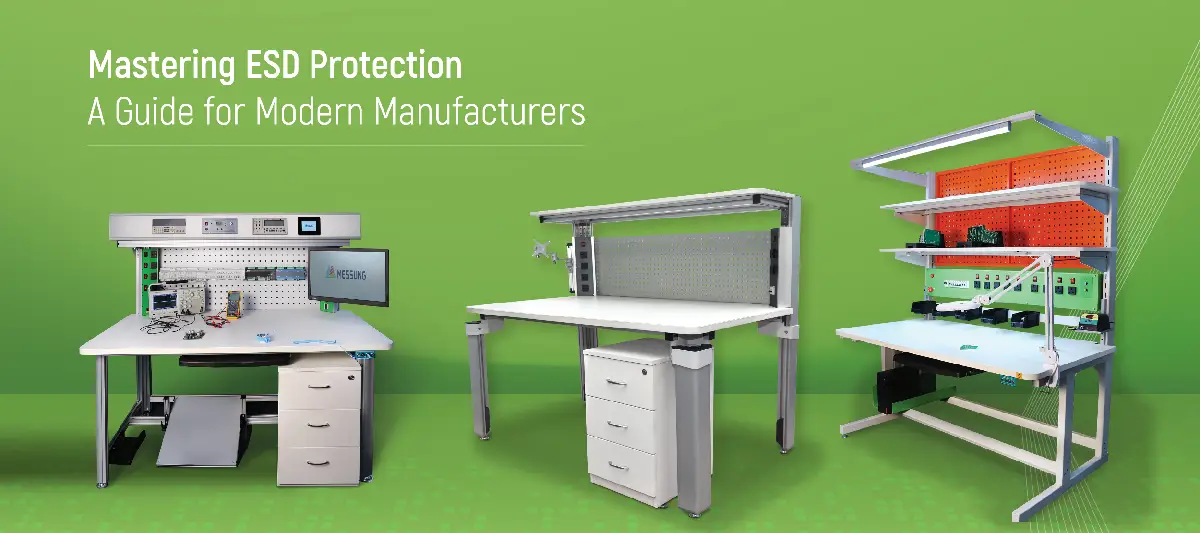
How to Set Up an ESD Workstation for Electronics Manufacturing
Introduction
Setting up an effective ESD workstation for electronics manufacturing goes far beyond simply placing a table. It’s about creating a controlled environment that protects sensitive electronic components from the invisible yet damaging effects of static electricity. Static can silently cause damage, leading to device failure, costly rework, or field defects that can tarnish your business’s reputation and bottom line.
If you’re planning to build or upgrade your ESD workstation, explore Messung’s range of modular ESD-safe solutions designed for the electronics manufacturing sector.
What Is an ESD Workstation?
An ESD workstation is a specially designed area engineered to prevent electrostatic discharge (ESD) from damaging electronic components. These workstations are crucial in environments such as PCB assembly, component testing, inspection areas, and repair benches.
Unlike regular workbenches, an ESD-safe workstation integrates conductive or dissipative materials, grounding mechanisms, and essential anti-static accessories. Every component, from the table surface to the seating and wrist straps, works together to ensure electrostatic charges are neutralised safely.
Why Proper ESD Setup Matters in Electronics Manufacturing
A single static discharge – often invisible to the naked eye can severely damage delicate ICs (Integrated Circuits), sensors or memory chips in an electronic manufacturing setting. Worse still, such damage may not show up immediately and could cause product failure weeks after it reaches the customer.
Research has shown that even a 100V discharge (which a human can’t feel) can destroy a CMOS chip. This can lead to costly rework, recalls, and irreparable damage to brand trust. A proper ESD workstation is crucial for quality assurance, compliance, and long-term operational reliability.
Key Components of an ESD Workstation Setup
To ensure your workstation is fully ESD-compliant and functional, here are the essential components:
1. ESD Workbench or Table
The ESD workbench serves as the heart of your workstation setup. Choose a workbench with a conductive or static-dissipative surface. It should feature grounding points and be sized to support your specific workflow and equipment load.
2. ESD Furniture and Structure
All structural components such as the frame, storage drawers, and shelving should be constructed from ESD-safe materials. Avoid using wooden or plastic furniture unless they are specifically treated for ESD protection. A solid, industrial-grade workbench provides both mechanical strength and static protection.
3. Grounding and Anti-Static Control
Grounding is vital to any anti-static workstation. This involves using wrist straps for personnel, ESD floor mats, grounding cords, and a common ground point. All equipment and surfaces should be bonded to this ground to safely discharge static electricity.
Designing the Right Layout for Electronics Manufacturing
Modular vs. Fixed Workstations
A modular ESD workstation offers flexibility, allowing your team to reconfigure the layout as production needs to change. Electronics manufacturing is dynamic, so workstations that can adapt to new products and equipment are essential.
Ergonomics and Operator Comfort
Workstation comfort is crucial for productivity. Opt for adjustable height benches, ergonomic reach zones, and ESD-safe seating (chairs or stools). This reduces operator fatigue and enhances focus, directly improving quality and output.
Step-by-Step Guide to Setting Up an ESD Workstation
Follow these simple steps to build a compliant and efficient ESD workstation:
- Identify Your Application: What’s your purpose? Assembly, testing or inspection?
- Choose the Right ESD-Safe Workstation: Consider surface material, frame design and the size of your equipment.
- Select Matching Accessories: Ensure the workstation is equipped with shelves, drawers, wrist straps and grounding kits.
- Ensure Full ESD Continuity: Test grounding paths with ESD testers to ensure proper discharge.
- Document and Train: Educate everyone using the workstation about ESD basics to maintain a compliant environment.
Common Mistakes to Avoid in ESD Workstation Setup
- Using non-ESD-safe tables
- Grounding mats without grounding the operator
- Lack of continuity between components
- Not considering modularity for future upgrades
- Treating ESD as a one-time task instead of an ongoing system
Choosing the Right ESD Workstation Manufacturer or Supplier
Selecting the right ESD workstation supplier is just as important as choosing the equipment itself. Look for a supplier who:
- Offers customised, application-specific workstations
- Understands your compliance needs, such as ANSI/ESD S20.20 and IEC 61340
- Provides high-quality materials and durable finishes
- Offers reliable after-sales support and modification options
For Indian manufacturers, choosing a reliable ESD workstation supplier in India ensures that products meet both performance and compliance benchmarks.
Conclusion
Setting up an ESD workstation in electronics manufacturing is more than just purchasing a table; it’s about creating a system that protects your components, ensures high-quality production and prevents costly failures.
From grounding to comfort, layout to modularity, every decision you make impacts the workstation’s effectiveness. As production needs evolve, choosing a partner who can build future-ready systems pays off in the long run.
Explore Messung’s ESD-safe solutions today and ensure your workstation is designed for maximum protection and operational efficiency.